
 Lomnera
Turn your inspection report into a plan.
Forty-three pages. Inspector shorthand. A deadline approaching. Lomnera helps organize findings in the app, surface what may deserve attention, and answer questions in plain English — grounded in what your inspector wrote.
The report is where Lomnera starts — not where it ends.
A long PDF becomes organized findings, clearer next steps, and ongoing context for your home.
Home Inspection Report.pdf
43 pages
Page 18 of 43
Dense · hard to scan
Long PDF
Organized findings
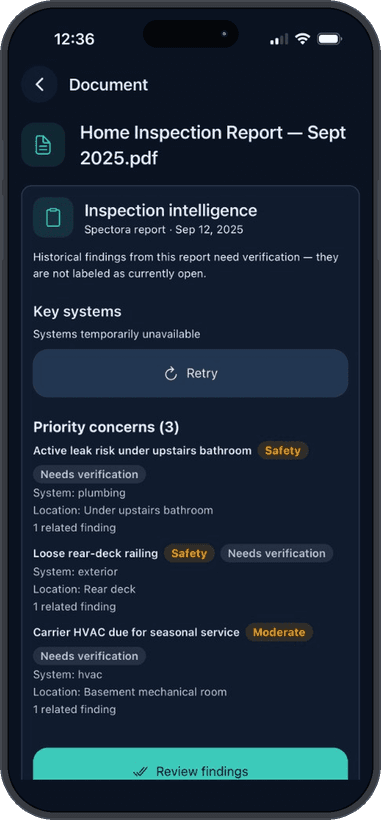
What happens after you upload.
Step 1
Lomnera processes the report.
Lomnera processes the report page by page — findings, ratings, system details, and limitations, including “not inspected” items that may leave important questions unresolved.
Step 2
Findings get extracted and organized.
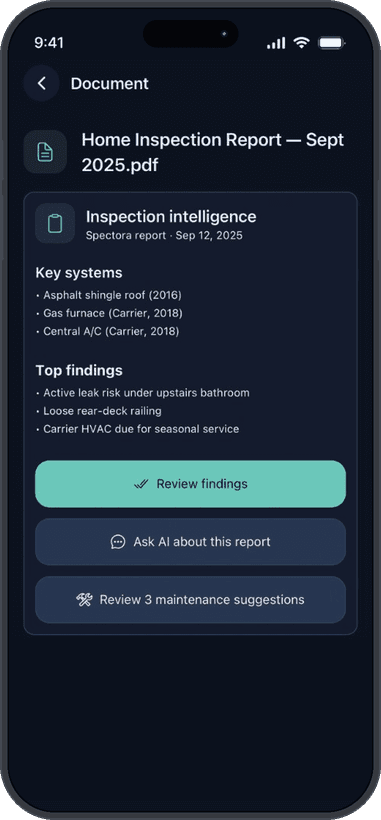
Safety concerns, major systems, deferred maintenance, and cosmetic items can be organized to help you see what may deserve attention first — not only in the order the inspector walked the house.
Step 3
Findings can stay linked to the source.
Extracted findings can remain linked to the relevant report section, keeping the inspector’s original language available for reference. Lomnera explains; your inspector’s words remain the record.
Step 4
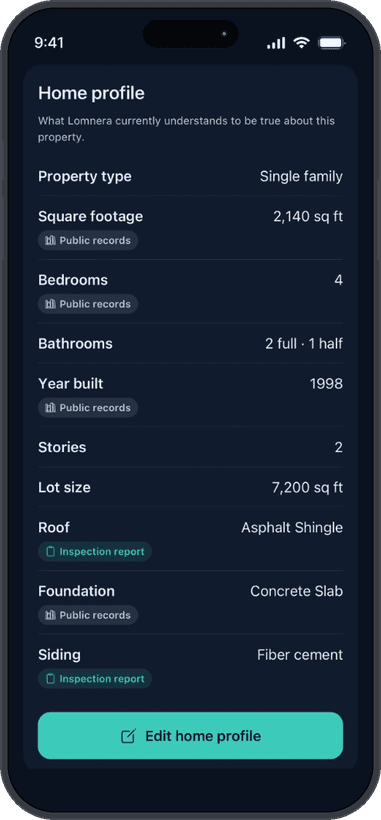
Your report helps build your home profile.
When supported by the report, details such as system types, materials, brands, ages, and maintenance context can be added for review — so you are not starting from a blank profile.
Step 5
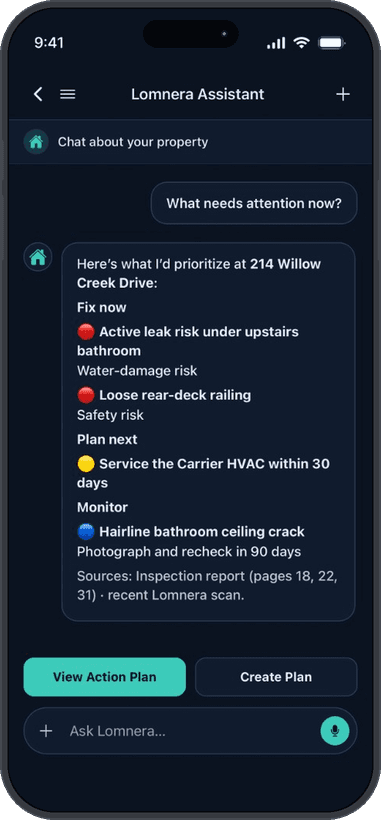
Then you ask questions.
“Which of these would you handle first?” “What kind of contractor handles this item?” “What did the report say about the roof?” Answers can be grounded in your report and related home records.
What Lomnera helps with — and what it doesn’t decide
Helps you understand
- What each finding means in plain English
- How urgently something may need attention
- Estimated cost ranges for planning
- Whether an item is typically DIY or a job for a licensed professional
- What questions to ask your agent and contractors
Does not decide
- Whether you should buy or walk away from a home
- What a seller must legally repair
- Exact repair prices — ranges are planning estimates, not quotes
- Anything your inspector did not observe — Lomnera reads the report; it does not re-inspect the house
Your report stays yours.
Uploaded reports live in your document vault, power your own home’s experience, and can be deleted by you. See Security and AI & Safety for more.
Questions homeowners ask
- How long does processing take?
- Processing time depends on report length, formatting, and whether the document is scanned. The app shows progress while the report is being processed.
- My inspection was months ago. Is it still worth uploading?
- Yes. Your report is a snapshot of your home’s systems, ages, and open issues. Lomnera can help turn it into clearer property context and an ongoing maintenance plan whenever you upload it.
- What if my report is from a small local inspection company?
- Because clients upload the delivered PDF, the workflow does not require a direct integration with a particular report-writing platform. Report formatting varies, and processing quality may depend on the document.
- Can I upload a report on the website?
- Report upload is in the Lomnera mobile app. Get the app to add your report — there is no browser upload on this site.
- Do I need Pro to use the decoder?
- You can start free. Fuller report intelligence is part of Pro ($14.99/mo or $119.99/yr). Final plan details are shown before purchase in the App Store.
Your report. Finally useful after closing.
Launching soon
Cost figures are AI-generated planning estimates based on typical regional pricing, not quotes or bids. Actual costs vary. Lomnera is not a licensed contractor and is not a substitute for professional evaluation.